Ad Extensions

Google offers several ways to add value or information to search adverts. These are referred to as Ad Extensions. For a search advertiser, the Ad Extensions offer a way to get additional information into a search advert without affecting standard advert copy limits.

AdWords currently offers seven text Ad Extensions:

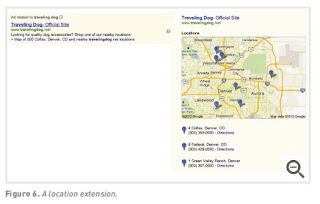
1.  Location Extensions

Location extensions allow you to add location information and maps to your advert. To use the extensions, you can either insert your address manually or link your AdWords account to your Google+ Local (www.google.com/local) account.
2.  Call Extensions

The call extension allows you to display a local phone number in a line below the standard text advert. This is particularly effective in mobile ads, where the user can click and call directly from their phone.

3.  Social Extensions

The social extension indicates how many Google+ users have +1ed or followed the brand. This provides added social relevance on search results and is also a contributor to ad quality score.

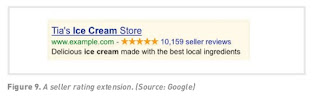
4.  Seller Ratings
Google will match the domain used in the advert to review sites and display rating information together with your text ad. This is very useful if you have excellent ratings!
5.  Sitelinks

Sitelinks allow you to display up to six additional links, each with a unique destination URL, with your advert. Each link is limited to 35 characters. Sitelinks allow you to direct users to more relevant areas of your website, all from one advert. They are suitable for advertising on more general or branded keywords.

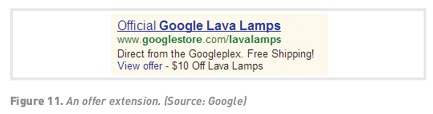
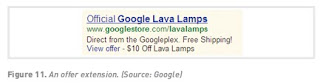
6.  Offer Extensions

By linking your AdWords account to your Google Merchant Center account and supplying a product feed, you are able to include product images in your search adverts when available. This is particularly useful for eCommerce advertisers.
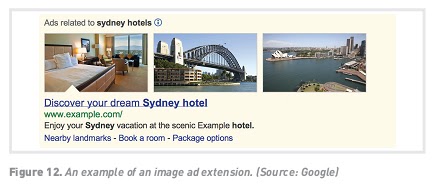
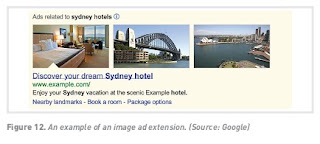
7.  Image Extensions

At the time of writing, these are still in beta, with only a few advertisers allowed to use them. These allow images in ads to extend, so that advertisers can promote products through an image directly from the ad itself.

Display URL

Search ads allow you to include a display URL. The URL shown is not necessarily the URL that the user will click through to – the display URL (what is shown on the advert) actually directs to the destination URL (what the actual URL of the page is). The display URL is sometimes also called a vanity URL.


The display URL must be the same domain as the destination URL. Google will show only one advert per domain.

The page that the user is taken to is called the landing page, which can be any page on your website, not necessarily the home page. The aim should be to send users to a web page that is as specific to their search, and the PPC advert, as possible. This is known as deep-linking.

 Landing pages

Search advertising is not just about creating adverts and bidding for keywords. The process continues once a user has clicked on your advert. The page that the user reaches by clicking on an advert is called a landing page – either an existing page on your website, or a new custom-built page for the campaign at hand (useful if you are running a competition or special offer).


Landing pages can make or break an advertising campaign. Poorly executed PPC campaigns will send all users to the home page of a website. Campaigns that convert will make sure that users land on a page that is relevant to their search with a very visible Call to Action. The aim is to keep the user as focused on the goal – conversion – as possible. Sending users to the home page gives them too many other options to choose from.

For example, if someone searched for ‘Canon EOS 450D’, a poorly run campaign would send that user to www.canon.co.uk. 

A better campaign would have the user clicking through to www.canon.co.uk/For_
Home/Product_Finder/Cameras/Digital_SLR/EOS_450D/index.asp.
Landing pages also indicate relevance to the search engine, which can increase
the Quality Score of the advert, and in turn lower the cost per click (CPC) of the
keyword. Adding keyword-rich pages to the website can also have SEO benefits.
PPC campaigns often have thousands of keywords, which can mean that you will
have a lot of landing pages to build. Creating dynamic landing pages means that
with a simple script, unique keyword-rich landing pages can be created for every
search. The script will take the keyword that the searcher has used, and insert it
in predefined places on the landing page. The user will then be landing on a page
that is highly relevant to their search.

Writing effective copy

For most PPC adverts, the advert copy is the only tool available to attract attention, convey a message and entice action. This is why writing effective advert copy is such an important skill for search advertising.

People who are searching for something usually have a specific intent – they are looking for information, guidance, comparisons, tools, or solutions to their problems. It’s important to understand why somebody would look for your brand or product – and what keywords they would use to find it – when crafting your search ads. Look at the considerations for choosing keywords that are covered in the Search Engine Optimisationchapter – these often overlap.

 Use compelling and well-crafted Calls to Actionso that users know what to do and what to expect: ‘try now’, ‘sign up now’, ‘buy now’.

Many advertisers test offers in the advert copy, such as a discount or limited- time voucher. Product or service benefits make for good advert copy, such as free shipping, secure shopping or fast delivery.

If you are running many ads at once, it can be quite a lot of work to create unique copy for each one. Dynamic keyword insertion (inserting the search keyword dynamically into the advert copy that appears) or using the keyword in the advert copy can help. Dynamic keyword insertion takes the keyword in your campaign that matches with the user search query and inserts it into the ad automatically. This way, the ad looks more relevant to the user than a generic ad. The search engine will mark words that match the search term in bold, making the advert stand out a little bit more.

The downside of using dynamic keyword insertion is that you have less control over when an ad is shown to a user, and the results may not be as good as with a standard SEM campaign. The goal is to generate as many clicks as possible, but sometimes the advertiser is better off with fewer, high-quality clicks that generate actual sales.

The long tail

Moz, a respected SEO blog, asserts that 70% of searches on the web are unique (Moz, 2012). This means that the sum of searches that are unique is higher than the sum of non-unique searches. Looking a little more closely at search terms will show a small number of high-volume searches, and then a large number of lower volume searches stretching out to those unique searches.


This is sometimes referred to as the long tail of search. Discovering these low-volume, niche search terms can do wonders for a search advertising campaign. Generally there is not much competition for these search terms, and the search term itself is very much targeted, so it will likely be cheaper to bid on and may yield a high conversion rate. While long-tail phrases are generally cheaper and lead to a higher rate of conversions, you will need to use a much larger number of them to make up for the lower traffic volume that they generate.

 Also consider that search engine users may be at various stages of the buying cycle, and it could be worthwhile to craft a long-tail keyword strategy targeting those who are at the end of the buying cycle and know specifically what they are looking for.

For example, if you sell cameras, targeting the term ‘camera’ may not bring in much targeted traffic (since someone searching for ‘camera’ may be looking for information, pictures, price comparisons, or even something completely unrelated). But someone looking for ‘buy Canon DSLR camera in London’ has a clear intention in mind and could be a great target for advertising.

Ad text

The ad text is the main component of a search ad. Search engines limit the characters in each line. There are also restrictions on what you are allowed to write in an advert. Here are some of the ditorial guidelines from Google AdWords:

•  Heading: maximum of 25 characters
•  Line 1: maximum of 35 characters
•  Line 2: maximum of 35 characters
•  Display URL: maximum of 35 characters
•  No repeated exclamation marks.
•  No word may be written in capitals only.
•  No nonsense words may be used.
•  No claims of ‘best’, ‘number one’ or superlatives may be used unless they can be verified by a reliable third-party source.
•  Product numbers may be used.
•  No phone numbers allowed in the copy.

The elements of a search ad

Basic search adverts all follow a similar format:

Heading

Two lines of advert copy.

Sometimes shown on one line.

www.DisplayURL.com

Ad extension

As you can see, these consist of several elements – the key is to make these work together harmoniously in order to get searchers to click through to your website.

The three main components are:

•  Keyword-optimised ad text
•  The link to your owned property (website, social media platform, content)
•  Ad extensions

Structuring your search advertising campaign


When you start running search advertising, you shouldn’t just create a whole stream of ads – you need to have a plan.

Your AdWords account is your home for all the ads you are currently running, and it should be structured to reflect your business and marketing strategy. Within your account, organise your search adverts in groupings – called campaigns – according to your strategy and the ads you are running. Within each campaign, you should have ad groups – these are sets of ads that have a common characteristic or focus. For example, if you are selling books online, you may have ad groups focused around a specific genre, author, event and special offer, as well as some ad groups around general themes such as promoting local stores, or making online sales.


Structuring your account in this way will help you to easily oversee your advertising spend, determine the effectiveness of your ads, manage your ads and bids, and switch off any ads that aren’t working effectively.

Advertising in search

Search engines display results to search queries based on proprietary algorithms. Each major search engine uses its own formula to determine what results to display for any term. According to PEW Internet, 73% of all Americans use search engines, and 59% of them use search engines daily; on top of that, 91% of people who use search engines say that they find the information they are looking for most or all of the time (Purcell, et al., 2012). With search engines getting so much traffic, and delivering so much value, they need to find a way of generating revenue.

With so many search engines out there, which platform should you choose?

There are some small differences from platform to platform in terms of editorial policy, and each system has a different user interface. There is some theory that different platforms are better for different industries, for example, that Yahoo fares better than Google on travel advertising. However, this is subjective, and most large advertisers will run PPC campaigns on a number of platforms. As with most things in digital marketing, it is all about testing.

Google AdWords is the best known and is considered the industry standard; it allows users to transact in the currency of their choice, is tied to a comprehensive analytics tool, and offers training programmes and certifications. Google AdWords also currently has the best contextual and geographical targeting worldwide, although geo-targeting is also offered by Bing Ads, Facebook Ads, LinkedIn Ads and YouTube video ads (which is closely linked to AdWords).

Search Advertising Key terms and concepts


Term Definition
Clickthrough A click on a text ad link that leads to a website.
Clickthrough rate (CTR) The total clicks on a link divided by the number of times that ad link has been shown, expressed as a percentage.
Conversion rate The number of conversions divided by the number of visitors, expressed as a percentage.
Cost per action (CPA) The amount paid when a certain action is performed by a user.
Cost per click (CPC) The amount paid when a link is clicked on.
Google AdWords Google’s search advertising program, which allows advertisers to display their adverts on relevant search results and across Google’s content network.
Impression Each time an advert is shown.
Key phrase Two or more words that are combined to form a search query - often referred to as keywords.
Keyword A word found in a search query. For example, a search for ‘blue widgets’ includes the keywords ‘blue’ and ‘widgets’.
Organic results Also known as natural results. Search results served by the search engine’s algorithm. The search engine does not charge website owners to list these results.
Paid search advertising Usually refers to advertising on search engines, sometimes called PPC advertising. The advertiser pays only for each click on the advert.
Quality score (QS) A measure used by Google AdWords to indicate how relevant a keyword is to an ad text and to a user’s search query.
Return on investment (ROI) The ratio of profit to cost.
Search term The keywords a user enters when searching on a search engine.
Search engine results page (SERP) The actual results returned to the user based on the search query.
Sponsored results Search engine results that are paid for by the advertiser.

Search Advertising Introduction

Search advertising, also called pay-per-click (PPC) advertising, is a way to advertise your business or product directly on search engine results pages, where the advertiser pays only for each click on their advert.

Search advertising continues to evolve, and formats available range from simple text adverts through to rich media banners and even video adverts. PPC advertising revolutionised the online advertising industry, and today, search advertising generates 95% of Google’s revenue (Peterson, 2013).

Adverts on search engines are easy to spot – they’re clearly labelled as advertising and are separated from organic search results. They can appear on the top of the results page, usually in a box, and also on the right hand side of the results page.


Search advertising on search engines is keyword based – this means that it is triggered by the search term that a user enters into a search engine. Advertisers target the keywords for which they want to appear.

For the advertiser, the beauty of search advertising is that adverts are displayed when potential customers are already expressing intent – they are searching for a product or service. It allows advertisers to present their offering to a potential customer who is already in the buying cycle.

Google is, by a wide margin, the leader in the search advertising field; because of this, the chapter is very Google-centric, though the same principle should apply to any other search advertising platforms. Other platforms to be aware of are Bing,

Yahoo and Baidu.

•  How to put together a search advert
•  How to target your search ad at relevant users
•  The process of bidding on key phrases and how this affects your ranking
•  How to plan, set up and run your own search advertising campaign

What not to do

Black hat SEO refers to practices that attempt to game the search engines. If a search engine uncovers a website using unethical practices to achieve search engine rankings, it is likely to remove that website from its index.

Google publishes guidelines for webmasters, available through Google’s Webmaster Central (www.google.com/webmasters). As well as outlining best practice principles, Google has supplied the following list of don’ts:

•  Avoid hidden text or hidden links.
•  Don’t use cloaking or sneaky redirects.
•  Don’t send automated queries to Google.
•  Don’t load pages with irrelevant keywords.
•  Don’t create multiple pages, subdomains, or domains with substantially duplicated content.
•  Don’t create pages that include malicious behaviours such as phishing or installing viruses, trojans, or other malware.
•  Avoid ‘doorway’ pages created just for search engines or other ‘cookie cutter’ approaches, such as affiliate programmes with little or no original content. If your site participates in an affiliate programme, make sure that your site adds value. Provide unique and relevant content that gives users a reason to visit your site first.
•  Avoid link farms and focus on attracting quality, valuable links.

The bottom line: design websites for users first and foremost, and don’t try to trick the search engines. It will only be a matter of time before they uncover the black hat techniques.


Local search

Local search refers to search behaviour and results where location matters. Either results returned are local in nature, or results returned can be map based.

With blended SERPs, map-based results can be returned together with other types of results, depending on the type of search. As search engines become ever more sophisticated, location can be inferred and influence the type of results.


For example, a user may search for ‘plumber london’, and the search will know to return results for London plumbers. These may even be returned on a map. However, a user in London may search just for ‘plumber’. The search can infer from the user’s IP address that the user is in London, and still return results for London plumbers (since someone searching for this term is likely to be looking for
a nearby service).

For search engines to return location-relevant results, they need to know the location of things being searched for. This is often determined from sites that include the name and address of a business. Note that this site may not be yours. Location results are often determined from various review sites, and the results can include some of those reviews.

Search engines also allow businesses to ‘claim’ their locations. A business can verify itself through a process with the search engine, and ensure that location information is correct. Google+ Local is a good example of this – the business can claim a listing, add their details, and even receive reviews.


Mobile search

As web-enabled mobile devices continue to grow in the market, and become easier to use, mobile search remains a key growth area. Mobile searches tend to be different from desktop searches. They are more navigational in nature (users tend to know where they want to end up), and users are often looking for concise, actionable answers.

Mobile search input can also be different from desktop search. As well as typing in search keywords, mobile users can search by voice, or by using images or scanning barcodes.

As with mobile web development, mobile SEO is a little different from desktop SEO, although the fundamental principles remain the same. Build usable and accessible sites with great content, and you’ve already come a long way.

Where there are differences in approach for mobile SEO, these are largely because:

•  Search engines have the ability to deliver precise location-based results to mobile users.
•  Usability is critical in sites for mobile devices.
•  Search engines have less data to work with (compared to traditional web) in terms of site history, traffic, and inbound links.

The fundamentals of mobile SEO are not so different to those of desktop SEO.

1. A usable, crawlable site is very important.

Build mobile versions of your website that cater for mobile users: simple navigation and content stripped down to only what is required.

2. Content is important, and should be formatted for mobile usage.

Text and images should be optimised for the mobile experience – so no large file sizes! The meta data still matters: titles and descriptions are what users see in the SERPs.

3. Links are important.

You should link to your mobile site from your desktop site and vice versa. Submit your mobile site to relevant mobile directories.

4. Submit a mobile XML sitemap.

Mobile-specific sitemaps use the same protocols as standard XML sitemaps, with the addition of a mobile tag.

5. Use the word ‘mobile’ on the mobile website, or use mobile top-level domains.

Make it explicit to search engines that this is the mobile version of your website, and they are more likely to prioritise it as such.


Social and search

Social information is playing an ever-increasing role in search. Social content, such as Twitter messages or YouTube videos, can appear in the SERPs, and there is a growing indication of social influence on search rankings.

There are several social factors to consider when it comes to social and search.


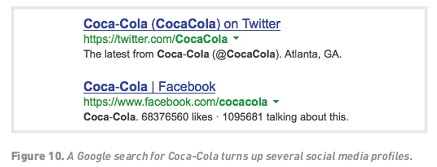
1. Use social media properties to dominate brand SERPs.

When someone searches for your brand name, you can use your social media properties to ‘own’ more of the results on that page, reducing the likelihood that a user will end up on a competitor’s website instead. Use your brand name when naming Twitter and Flickr profiles, and Facebook and YouTube pages.

2. Social links are used as signals of relevance.

Links from social sites such as Twitter include “rel=nofollow”. However, there is a strong indication that these links are in fact followed by search engines, and are used to determine relevance. If you focus on creating great content on your site and making sure that it is easy to share socially, you should see a result in your SEO efforts.

3. Personalised results are influenced by your online social network.

If you are logged in to a social network while searching (Facebook for Bing, or your Gmail account for Google), you could see results from or influenced by your social circle. In Bing, for instance, results can include indications of what your friends have previously liked or shared via Facebook. On Google, you may be more likely to see your friend’s blog for relevant searches.

4. Optimise for social search engines.

While Google is the biggest search engine worldwide, YouTube is the second biggest. Even within social properties, users still use search to find the content they are looking for. Content that is housed on these properties should be optimised for the relevant social search engine as well.


User insights

Search engines want their results to be highly relevant to web users, to make sure that web users keep returning to the search engine for future searches. And the best way to establish what is relevant to users? By looking at how they use websites, of course!

User data is the most effective way of judging the true relevance and value of a website. For example, if users arrive on a website and leave immediately, chances are it wasn’t relevant to their query in the first place. However, if a user repeatedly visits a website and spends a long time there, it is probably extremely relevant. When it comes to search engines, relevant, valuable sites are promoted, and
irrelevant sites are demoted.

How do search engines access this data?

Search engines use cookies to maintain a history of a user’s search activity. This will include keywords used, and websites visited from the search engine. Search engines gather data on the clickthrough rate of results, and on bounce rates.Site speed, that is, the performance of your website, is a contributing factor to ranking in Google. Google confirmed in April 2010 at this was one of over 200 ranking signals (Singhal, 2010).

So, what does this mean for SEO? When it comes to a website, it must:

•  Be valuable enough to attract both visitors and links naturally
•  Retain visitors and make sure they return to the website
•  Convert visitors

Competitor analysis


You can find out who is linking to your competitors, and which non-competing sites are ranking highly for your key phrases. Use this information to identify sites to target for link requests.

Using Google search, the following search operators can be used to find these links and websites:

•  Link:url.com
•  Link:http://www.url.com/page.html
•  Link:url.com –site:url.com

With all link-building tactics, make sure that you use your key phrases when communicating. You will be telling people how to link to you, and ensuring that search engines notice your authority.


How does a website get more links?

With links playing such a vital role in search engine rankings and traffic for a website, everyone wants more of them. There are certainly dubious means of generating links, most of which can actually result in being penalised by the search engines. However, here are some ways for ethical and honest website owners and marketers (and that’s what you are) to go about increasing links to their websites.

Create excellent, valuable content that others want to read

If people find your site useful, they are more likely to link to it. It is not necessary (or possible) to try to write content that will appeal to the whole of the Internet population. Focus on being the best in the industry you are in, and in providing value to the members of that community. Make sure that valuable content is themed around your key phrases.

Infographics are visual and graphic representations of data, and are a popular type of content that is useful to users, and can encourage lots of traffic and inbound links.

Create tools and documents that others want to use

Interview experts in your field, and host those interviews on your website. Create useful PDF guides for your industry that people can download from your site. Think outside the box for quirky, relevant items that people will link to. Calculators are popular tools, and we don’t just mean the ones that add two and two together. If you have a website selling diet books, for example, create a tool which helps users to calculate their body mass index (BMI) and target weight. Importantly, be unique!


Create games

Creating a game that people want to play is a great way to generate links. Make sure that the theme of the game is based on the key phrases for your website, so that when others talk about and link to the game, they are using your key phrases.

Capitalise on software and widgets

Widgets, browser extensions and other software that users love to use all help to generate links for a website. Quirk has released a Mozilla Firefox extension called SearchStatus that is exceptionally useful to the SEO community. Each time someone mentions this SEO tool, they link to Quirk. People also like to include fun widgets in their forum signatures – create a widget, make sure that the link is
included, and let people spread these around the web for you.


Not all links are created equal


Of course, not all links are equal. While link volume is the number of links coming to a specific page of your site, link authority looks at the value of the links. Some sites are more trusted than others. So, if they are more trusted, then links from those sites are worth more. Likewise, some sites are more relevant than others to specific terms. The more relevant a site, the more value is transferred by the link. Well-known and established news sites, government sites (.gov) and university domains (.ac) are examples of sites from which links can carry more weighting. Links form websites that have a higher PageRank also carry more link weight.


Search algorithms also consider relationships between linked sites. By analysing various things, the search engines try to determine if the links are natural links, or if they are manipulative, artificial links created solely for ranking purposes. Manipulated links are worth very little compared to natural links and may even lead to a drop in search engine rankings.

The search engine algorithm will also determine the relevancy of the referring website to the site being linked to. The more relevant the sites are to each other, the better.

Also consider that linking to valuable, relevant external resources can help to improve the visibility of your own site.


The parts of a link


Here is the HTML code for a link:

<a href=“http://www.targeturl.com/targetpage.htm”>Anchor Text</a>

•  <a href> and </a> are HTML tags that show where the link starts and ends.
•  http://www.targeturl.com/targetpage.htm is the page that the link leads to. You should make sure that you are linking to a relevant page in your site, and not just to the home page.
•  Anchor Text is the visible text that forms the link. This is the text that should contain the key phrase you are targeting.

The link sends a signal that the target URL is important for the subject used in the anchor text.

There is a lot more information that can be included in this anatomy, such as instructions telling the search engine not to follow the link, or instructions to the browser on whether the link should open in a new window or not.

<a href=“http://www.targeturl.com/targetpage.htm” rel=“nofollow”>Anchor Text</a>

•  rel=“nofollow” can be included in links when you don’t want to vouch for the target URL. Search engines do not count nofollow links for ranking purposes. This was introduced by Google to try to combat comment spam.


Link popularity


Links are a vital part of how the Internet works. The purpose of a link is to allow a user to go from one web page to another. Search engines, doing their best to mimic the behaviour of humans, also follow links.

Besides allowing search engine spiders to find websites, links are a way of validating relevance and indicating importance. When one page links to another, it is as if that page is voting or vouching for the destination page. Generally, the more votes a website receives, the more trusted it becomes, the more important it is deemed, and the better it will rank on search engines.

Links help send signals of trust.Signals of trust can come only from a third-party source. Few people will trust someone who says, “Don’t worry, you can trust me!” unless someone else, who is already trusted, says, “Don’t worry, I know him well. You can trust him.” It is the same with links and search engines. Trusted sites can transfer trust to unknown sites via links.

Links help to validate relevance. Text links, by their very nature, contain text (thank you, Captain Obvious). The text that makes up the link can help validate relevance. A link such as ‘Cape Town hotel’ sends the message that, “You can trust that the destination site is relevant to the term ‘Cape Town hotel’.” If the destination web page has already used content to send a signal of relevance, the
link simply validates that signal.


Optimising media

Images, video and other digital assets should also be optimised with the relevant keywords. Search engines cannot decipher multimedia content as well as text, so they rely on the way that media is described to determine what it is about. Screen readers also read out these descriptions, which can help visually impaired users make sense of a website. In addition, media such as images and video are often also shown on the SERPs. Proper optimisation can give a brand more ownership of the SERP real estate, and can also be used effectively to target competitive terms.

Just as rich media can help emphasise the content on a page to a visitor, they can also help search engines to rank pages, provided they are labelled correctly.

Here are some ways to optimise images with key phrases for SEO:

•  Use descriptive, keyword-filled filenames.
•  Use specific alt tags and title attributes.
•  Add meta information to the image. Make sure this information is relevant.
•  Use descriptive captions, and keep relevant copy close to the corresponding media. For example, an image caption and neighbouring text will help to describe content of the image.
•  Make sure that the header tags and images are relevant to each other.Also think about what other digital assets you have, and whether these can be optimised in line with your key phrase strategy. For example, consider app store optimisation (ASO) – the process of optimising your mobile and web apps for the specific web stores they are distributed in.

Here are some ways in which you can optimise your apps:

•  Give your app a catchy name that also includes your most important keyword or phrase.
•  Include a distinctive, recognisable and clear icon.
•  Spell out the features and benefits clearly, including key phrases where possible.
•  In your app store listing, add links to your major social media platforms and your website – and don’t forget to link the other way too!
•  Include as much meta data as you can, including tags, categories and descriptions (this will depend on the app store in question) (Bulygin, 2013).

The best way to ensure results is to focus on writing quality content while sticking to a few guidelines on tags and URLs. Remember, you want search engines to rank you highly for your content, but you also want to ensure that the content is a pleasure to read.

Regularly adding fresh, valuable content will also encourage the search engines to crawl your site more frequently.

Use your website and its pages to establish and reinforce themes. Information can always be arranged in some kind of hierarchical structure. Just as a single page can have a heading and then get broken down into sub-headings, a large website can have main themes that get broken down into sub-themes. Search engines will see these themes and recognise your website as one with rich content.

The best way to ensure results is to focus on writing quality content while sticking to a few guidelines on tags and URLs. Remember, you want search engines to rank you highly for your content, but you also want to ensure that the content is a pleasure to read.

Regularly adding fresh, valuable content will also encourage the search engines to crawl your site more frequently.

Use your website and its pages to establish and reinforce themes. Information can always be arranged in some kind of hierarchical structure. Just as a single page can have a heading and then get broken down into sub-headings, a large website can have main themes that get broken down into sub-themes. Search engines will see these themes and recognise your website as one with rich content.